I am now regularly publishing a lightly-redacted copy of the monorepo to GitHub.
Four years ago, I wrote about Khaganate, my suite of personal productivity software. Khaganate has evolved into a new system, started from scratch on 1 January 2025, that I call the "monorepo". What I describe here is my progress, 387 days, 838 commits, and 60+ bugs later.
Foundations
Hardware
My personal infrastructure runs on two computers:
- My macOS laptop
- A Dell workstation in my apartment ("the homeserver") running Rocky Linux on Proxmox
These machines are connected to each other and to my phone by a Tailscale VPN. The laptop is for development and for services that need to access local files (mainly, my Obsidian vault). The homeserver is for everything else.
The foundation repo
I keep configuration files, shell scripts, and Python libraries in a foundation repo that I clone on every computer that I use. I can configure a new computer in under a minute with wget https://iafisher.com/bootstrap.sh && bash bootstrap.sh ~.
The main purpose of the foundation repo is to ensure a consistent shell and editor environment across all my machines, but it also includes a few foundational Python modules, like the prelude that I import at the top of every Python file in the monorepo.
Files and databases
The laptop and the homeserver each have a ~/.ian directory. ~/.ian/repos/current is a symlink to the latest deployed source code of the monorepo itself. ~/.ian/apps/<APP> is for application-specific storage. Logs are at ~/.ian/logs/<APP>; the kg logs command is helpful for finding and viewing them.
The primary data store for my applications is not the filesystem, however, but the Postgres database that runs on the homeserver. The schema of the database is defined by a schema.sql file in the monorepo. The SQL file is run on every deployment; constructs like IF NOT EXISTS ensure that it is idempotent.
Each computer also has a local SQLite database for data that does not need to be centrally managed, or for operations that need to succeed even if the network connection to the homeserver is interrupted or unavailable. There is likewise a schema_local.sql file for SQLite.
The job scheduler
The job scheduler is my own homegrown cron, but friendlier:
- I can configure a new job with a JSON file in the repo, and it will be automatically scheduled when the repo is deployed. I can write
"schedule": {"daily": {"times_of_day": ["4pm"]}}– no more0 16 * * *. - It ensures that job logs, standard output, and standard error all go into the right place in the
~/.ian/logsdirectory. - It comes with a CLI frontend with commands like
kg jobs list,kg jobs show, andkg jobs run. - If a job fails, it sends me an email that includes the last 50 lines of the job's logs.
The job scheduler is one of the key components of the monorepo; it currently handles no less than 26 scheduled jobs!
lib/command
lib/command parses command-line arguments. It can infer the command-line interface from the type annotations of a Python function:
from typing import Annotated

from lib import command

def main_sync(
    *,
    quiet: bool,
    write: Annotated[
        bool, command.Extra(help="write to database instead of doing a dry run")
    ],
) -> None:
    ...

cmd = command.Group()
cmd.add2("sync", main_sync)
command.dispatch(cmd)
It is designed to allow multiple levels of nested subcommands, e.g.:
λ kg jobs daemon -h
Usage: kg jobs daemon SUBCMD

  Manage the daemon.

Subcommands:

  kill      . Kill the daemon.
  start     . Start the daemon.
  status    . Check the status of the daemon.
Many of the command-line applications in the monorepo use subcommands for clarity and organization.
lib/pdb
lib/pdb is a thin wrapper around Psycopg:
from lib import pdb

with pdb.connect() as db:
    book_models = db.fetch_all(
        pdb.SQL("SELECT {} FROM {}").format(T.star, T.table),
        t=pdb.t(models.Book),
    )
By default, with pdb.connect() executes the body in a single database transaction, but you can also choose autocommit mode, or manage transactions manually.
I don't use an ORM, but I do have a Python script that parses the SQL schema file and generates a Python class for each database table. These classes include constants for the table and column names, so if I rename or delete a column, the typechecker will find any places where that column is used in code. In the snippet above, T.star and T.table come from the auto-generated class.
lib/kgjson
lib/kgjson converts Python dataclasses to and from JSON:
from lib import kgjson

@dataclass
class Message(kgjson.Base):
    title: str
    body: str
    html: bool
    throttle_label: List[str]
    high_priority: bool
    extra_css: str

message = Message()
json_string = message.serialize()
message_again = Message.deserialize(json_string)
The JSON schema is inferred from the type annotations. A kgjson.Base class can have another kgjson.Base class as a field.
lib/obsidian
I use Obsidian, the note-taking app and Markdown editor, heavily in my daily life. lib/obsidian lets me manipulate Obsidian-flavored Markdown files in Python:
from lib import obsidian

vault = obsidian.Vault.main()
for path in vault.markdown_files():
    document = obsidian.Document.from_path(path)
    print(document.word_count())

    for section in document.sections():
        print(section.title())
Web applications
Web applications use Flask on the backend and Mithril.js on the frontend. I have DNS set up in my Tailscale VPN so that my web services can use short URLs like http://bookmarks/. I use Caddy as a reverse proxy.
Other utility libraries
lib/dblogfor lightweight structured logging to the local SQLite databaselib/emailalertsfor sending email alerts, with throttlinglib/githelperfor working with Git repositorieslib/humanunitsfor converting to and from human-readable units like '1h' or '2 MB'lib/oshelperfor OS utilities, like replacing files atomically and managing lock fileslib/secretsfor managing secret values like API keys more securely than as plaintext environment variableslib/simplemailfor sending emails to myself using the Fastmail APIlib/tabularfor printing tabular data in the terminallib/timehelperfor date and time utilities
Deployment
My development environment is kept separate from the live environment on my laptop and on the homeserver. The core of the deployment script is just git push, but there are a good number of set-up and clean-up steps, like building the frontend assets and running schema.sql to update the database schema.
Applications
app/habits
This is one piece that has changed only modestly since 2022, when I wrote:
The first iteration of the Khaganate habit tracker was similar to Loop, with a set cadence for each habit and a grid of daily checkmarks. I switched to a linear view because it takes up less space and allows me to record multiple instances of the same habit in a single day. Each habit carries a certain number of points, and I track the total points from good and bad habits on my metrics dashboard. The individual habits are also useful as their own metrics (e.g. "How many times did I cook this month?"), and for setting goals that can be tracked automatically (for example, "Eat out less than X times a month").
Habits are still color-coded as good (green), neutral (gray), or bad (red) – indeed, the UI has changed little in 4 years – but I no longer track "points" or set goals, and I've broadened the definition of "habits" to include, e.g., how often I fall sick or how often I give a presentation.
app/bookmarks
app/bookmarks is a web UI for articles and webpages I wish to read, which are automatically pulled from a few sources:
- My unread bookmarks in Chrome
- RSS feeds I follow
- The front page of Hacker News each day, filtered by an LLM
The web interface was mainly written by Claude Code, and I had it add some bells-and-whistles like categorization, editing, and shuffling, which I in fact seldom use.
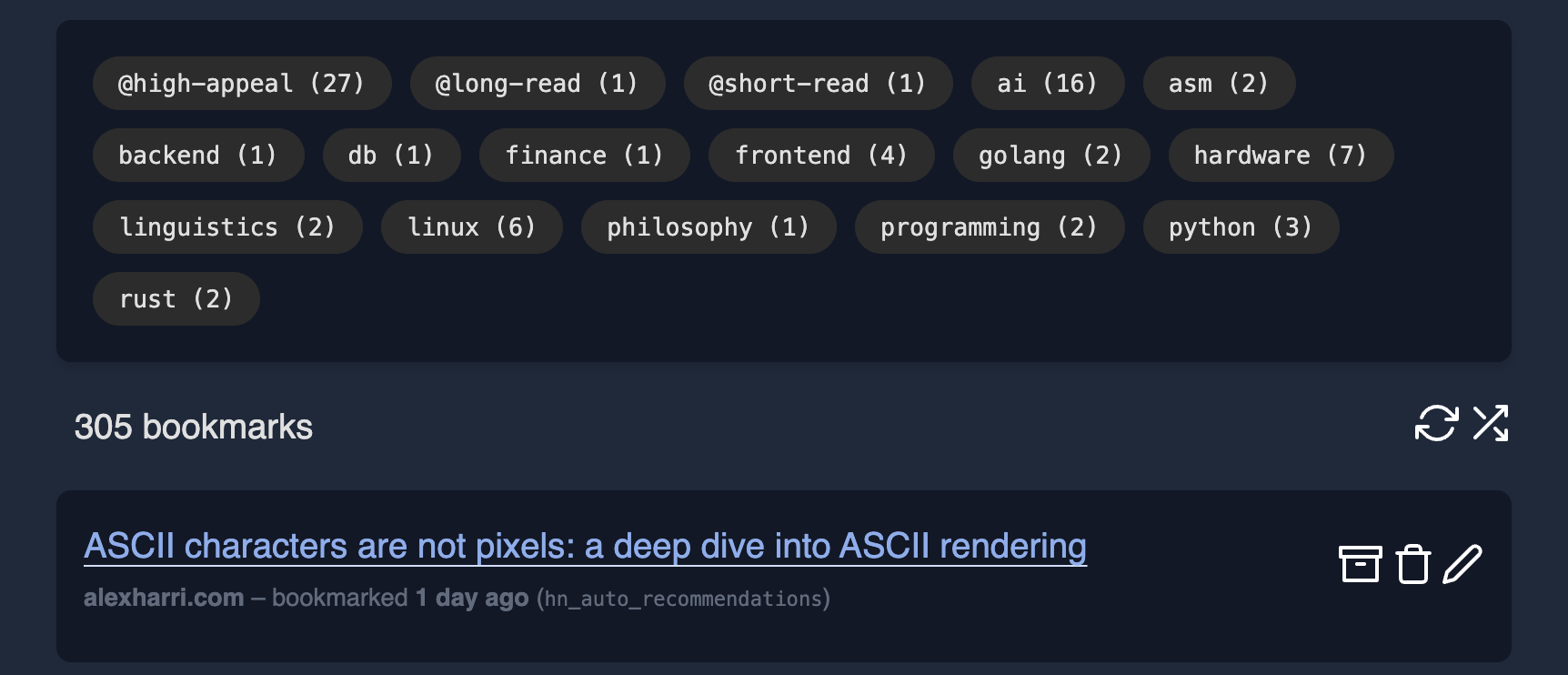
Bookmarks that remain unread after 60 days are silently pruned.
app/golinks
A go link is a short, named link like 'go/crossword' that redirects to a target page. My original implementation of go links was a browser extension; the current implementation is nothing more than a barebones HTTP server that reads from a single database table, plus a DNS entry for the top-level 'go' domain.
app/is-it-up
app/is-it-up checks once an hour that my personal website and CityQuiz.io are running, and sends me an email if they are not.
app/obsidian
app/obsidian is a collection of Python scripts for my Obsidian vault. The main job is called tidy. Its purpose is to create backlinks from, e.g., a dated page like 2026-01-habits-reorganization.md to the corresponding journal page, or to a 'topic' page like t-software-projects. It uses lib/obsidian to parse and update the Markdown files in-place.
My Obsidian vault is also a Git repository; a regular snapshot job creates a commit with all unstaged changes.
app/obsidian_plugins
Besides the Python scripts in app/obsidian, I have some proper Obsidian plugins written in TypeScript:
- A quick switcher that I like more than both the built-in switcher and Omnisearch
- A find-in-file plugin that uses
ripgrepto search the vault
app/money
app/money ingests transaction CSV files from my bank accounts and credit cards, normalizes them, and stores them in my database. (I still download all the CSV files manually; this is one thing I want to automate further.)
I can run money summary 2025q3 on the command-line to see how much I spent in the third quarter of 2025, broken down by category. Compared to the pie and bar charts that I had in Khaganate, the state of things in app/money is less sophisticated, with the major exception that transactions are imported automatically from my statements – in Khaganate, I had to enter every transaction manually.
Other apps
app/logrotatedeletes old log files in~/.ian/logs.app/backupsaves a back-up of my laptop's hard drive to Backblaze every night.app/llm2andapp/llmwebare the command-line and web interfaces, respectively, to my LLM tooling, which I will discuss in greater detail in a future post.- I self-host a Jupyter instance which I use for one-off projects like graphing my habits over time or analyzing my finances.
Future directions
The monorepo isn't open-source for the sake of my personal privacy, but the foundation repo is, and I intend to move many of the monorepo libraries there once they are stable.
Little of the code in the monorepo was written by AI. I expect to use LLMs more in the future but will still likely continue to write most of the code myself. After all, I do enjoy programming for its own sake – otherwise I might as well have used Click and Pydantic instead of writing my own lib/command and lib/kgjson.
In my post on Khaganate, I asked:
I've certainly spent a lot of time on Khaganate — the git repository has more than 2,300 commits since November 2019. Has it been worth it?
I answered 'yes' then, and even though I eventually retired Khaganate, I continue to think that my personal software infrastructure is something worth investing in. ∎